If you run a small business and haven’t been recognised yet, this Local SEO Checklist UK for small businesses guide is for you.
If your business doesn’t show up when people search for ‘best bakery near me’ or ‘best pizza shop near me,’ you are invisible to your target audience. You need Local SEO to attract your target clients and beat your competitors.
This guide explains why local SEO matters for small businesses in the UK and the local SEO checklists, including Google Business Profile and schema markup, that you should follow to run a successful business in your town.
What is Local SEO and Why it Matters for UK Small Businesses
Local SEO is the process of optimising your online presence so that when people search for a relevant query, your local business shows up. If you run a bakery, a jewelry shop, or any small business and are new to the field, you need local SEO to reach your customers. You don’t need to outrank big sites; beat the 3 or 4 sites competing for the same business, and you are good to go.
If you have an established business, you’re already getting clients; for small businesses, it matters even more. If you haven’t optimised your website for local searches, you are missing out on a great opportunity to get customers.
Local SEO Checklist UK for Small Businesses 2026: A Quick Guide
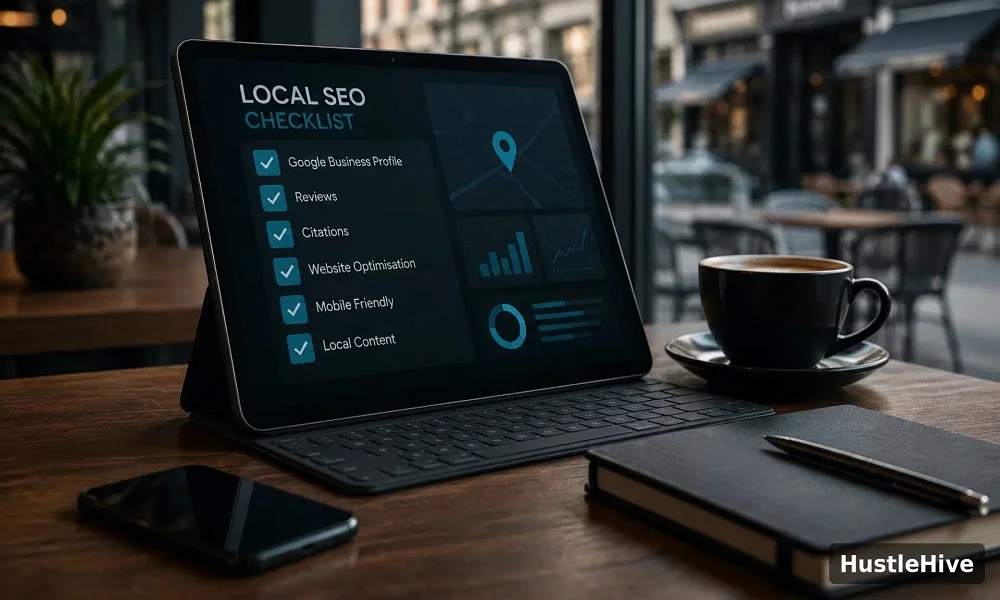
Here is a quick version before heading to the detailed guide.
- Optimise Google Business Profile.
- NAP information should be consistent across platforms.
- Use local keywords to target local traffic.
- Optimise the titles and meta descriptions.
- Build local citations.
- Never overlook Google reviews.
- Your website should be mobile-friendly.
- Fix technical issues to improve user experience.
- Use Schema markup.
- Create local backlinks.
- Never buy customer reviews, as it violates policy.
- Improve internal linking.
- Track Local SEO.
Local SEO Checklist UK for Small Businesses: A Detailed Guide
Every local business wants to rank on Google and compete with other sites, but most don’t know the right steps. Here are checklists to help you rank locally.
1. Claim and Optimise Google Business Profile
In local SEO, optimising your Google Business Profile always comes first. First, claim the profile if you haven’t already. For this purpose:
- Go to Google Business Profile to help Google discover your business in Search.
- Enter the business name. If the profile already exists, claim it. However, if it doesn’t, click ‘Add your business to Google.’
- Complete all the steps with authentic information.
- You may need a video, phone number, and email, depending on your business.
- Be consistent with the information, including Business name, Address, Phone number, website, Business category, and opening hours.
- If you are selling a product, keep adding the latest photos.
- Once the customer starts using your product, ask them to leave a genuine review.
- Update the profile regularly and respond promptly.
Mistakes to Avoid
- Do not leave the profile untouched once you have created it.
- Keep the information identical across all platforms.
- Don’t choose overly broad or unrelated categories.
2. Be Consistent with NAP Information
NAP stands for Name, Address, and Phone Number – it needs to be identical whenever it appears on any platform: your website, GBP, social platforms, and directories. Inconsistency creates confusion about what’s authentic, and you won’t be considered reliable. Later, if you change your phone number, update it on all platforms without delay.
To spot inconsistency or track local citations, you can use the BrightLocal tool, which is best for Local SEO and has a 14-day free trial.
3. Build Local Citations on UK-Specific Directories
Citations are online mentions of your business that don’t generate links. Authentic, consistent citations are important because they build trust and credibility with search engines and show you have a real business, boosting local rankings.
As you are running a UK business, choose UK-focused directories instead of global ones. A few include:
- Yell.com
- Scoot
- Thomson Local
- FreeIndex
- Central Index
- Yelp UK
- 192.com
Choose based on your business type. Always select the relevant one, as it creates more impact than adding low-quality, outdated citations.
4. Be Responsive to Google Reviews
Don’t overlook Google reviews, as they bring in more customers. Most people check ratings before reaching out. Once you get a happy client, ask them to leave a valuable comment. Share the link with them instead of simply asking for a comment.
Handle negative reviews professionally, and don’t buy positive ones because it is against Google’s policy. Also, make sure your site has new reviews, as this builds trust with visitors.
5. Focus on On-page SEO
- First, target local keywords to optimise on-page SEO. Include the city/area where your business is located. For instance, if you run a business in London, mention the city to reach people in that area.
- Include the keyword in the meta description and call to action.
- Keep the URL structure clean and easy to understand.
- Create separate pages for each service if you serve multiple areas.
- Add an FAQ section.
- Add high-quality, keyword-rich images with title and alt text.
- Do not forget to add internal links.
- Lastly, your contact page must have your business name, address, and phone number.
If you are unsure about which tool is best for On-page SEO, here is a guide to free SEO tools for beginners. However, if you’re new to SEO, here’s a beginner’s guide to getting started.
6. Create Local Backlinks
You can build backlinks in different ways. Choose industry-specific directories or create backlinks through relationships. You can partner with fellow local businesses or join associations or chambers. Local newspaper PR can strongly impact your domain and may help drive traffic.
Content-driven backlinks can also give your business a huge boost, such as writing guest posts, creating local content, or getting featured in blogs and local news.
7. Make your Website Mobile-Friendly
Most searches happen on mobile, as people may be searching while out and about. Slow mobile loading speed will have a negative impact, and you might lose some clients/ Hence, to make your site mobile-friendly, you should:
- Test the speed on mobile regularly
- Avoid heavy images, and always compress them before uploading
- Your phone number must be clickable
You can check your site’s speed with a free tool like Google PageSpeed Insights. It helps fix speed and loading issues on both desktop and mobile.
8. Use Schema Markup
Schema markup is structured data markup that works behind the scenes to help your online business grow. It makes the content look eye-catching by adding FAQs, Review stars, etc. You can use free SEO WordPress tools like Yoast and Rank Math to add Local business schema with a few settings. You can also use a Schema Markup testing tool to test the results.

9. Track Local SEO
Once you have completed local SEO, keep tracking because it is not a one-time process. SEO keeps evolving, so stay aligned with Google’s algorithms. Also, keep a record of important local search terms and compare your visibility over time. It is how to rank locally in the UK.
Common Local SEO Mistakes to Avoid
If you do local SEO yourself instead of hiring someone, watch out for a few mistakes that can hurt credibility and quality. Those mistakes include:
1. Avoid Keyword Stuffing
Don’t mention website information or keywords on every page; Google considers it keyword stuffing. It will negatively impact your website.
2. Never Purchase Fake Reviews
Never use fake reviews, as they break credibility and customers’ trust. This also violates Google’s policy. Ask your happy client to leave a review by sending them the link.
3. Add Correct Business Information
Outdated business information can mislead your customers. If you recently changed your number or address, update it across all platforms.
4. Creating Low-Quality Backlinks
A few high-quality backlinks are better than thousands of cheap links that won’t benefit your website.
5. Ignoring Mobile Users
Most searches happen on smartphones, so ignoring mobile users means losing potential customers. Make your website mobile-friendly to give your clients a good user experience.
Frequently Asked Questions
Q: How long does local SEO take to show results?
A: Small businesses start getting results within 4 to 6 weeks for low-competition searches. However, competitive local rankings can take about 5 to 6 months to show results.
Q: Is Google Business Profile Free?
A: Yes, it is completely free, and no paid version exists.
Q: Do I need a website to rank in a local map?
A: No, it is not compulsory; however, a well-structured website improves your credibility, and it gives clients something to learn about your business. It also enhances the ranking potential.
Q: Is SEO worth it for a small business?
A: Yes, SEO is worth doing for small businesses because it drives organic traffic that is long-lasting.
Final Thoughts
Local SEO can make a significant difference for small businesses in the UK that want to become more visible to customers. This guide on the Local SEO checklist UK for small businesses will help you optimise your Google Business Profile and attract real visitors.
Write location-focused content, encourage customers to share genuine reviews, keep your information consistent and accurate, and invest in on-page and Off-page SEO, and you will surely succeed. However, if you plan to hire an SEO agency for these services, check out our Top 5 Local SEO agencies for UK guide.